Skip to content
Manoj Gavi
Live demoPortfolio project

Healthcare Intelligence Platform

Healthcare interoperability + AI workflow automation

A platform that receives healthcare data, checks it, cleans it into one consistent format, and uses an AI agent to find and explain relevant information — always pointing to the evidence it used.

Synthetic data only. Portfolio demonstration. No real patient information is used. Not medical advice.

Hospitals and clinics exchange information in several different formats, and those formats are often incomplete or inconsistent. Before anyone can ask a useful question of the data, it has to be checked and translated into one reliable shape.

This platform does exactly that. It accepts three common healthcare formats, validates every message step by step, converts everything into the modern FHIR standard, and scores data quality. On top of that clean data sits an AI agent that answers care-coordination questions — like “Was this patient recently discharged, and do they have a follow-up?” — and cites the records it used.

The answer is checked before it is shown: if a sentence isn't backed by the evidence, it's rejected. The whole system also runs without any AI model configured, which makes it predictable and easy to test.

At a glance

  1. Data
  2. Validation
  3. FHIR
  4. AI Agent
  5. Tools + RAG
  6. Evidence
  7. Answer
  • Three input formats, one pipeline

    HL7 v2, C-CDA and FHIR all go through the same staged checks.

  • Data-quality scoring

    A 0–100 score per record, with issues explained and bad records quarantined.

  • Grounded answers

    Every claim must point to evidence, or it doesn't make it into the answer.

  • Safety screening

    Refuses prompt-injection attempts and emergencies; never gives diagnoses or treatment advice.

Live demo

Try it yourself

The application runs separately and opens in a new tab. Use the public demo account to sign in.

Once you're in, try this

  • Open the Agent page and ask: “Was this patient recently discharged, and is a follow-up scheduled?”
  • Open Ingestion and send a sample HL7 message — watch each validation stage pass or fail.
  • Open Quality to see which records were quarantined and why.
  • Open a Trace to see every step and tool call behind an answer.

Public demo account

Demo account — limited access.

Live demo

Demo credentials will appear here once the public demo is deployed.

No password needed: on the app's landing page, click “Explore the demo” to sign in with a limited demo role. The free server sleeps when idle, so the first load can take up to a minute.

  1. 1. Copy the credentials
  2. 2. Open the live demo (new tab)
  3. 3. Sign in and explore

Synthetic data only. Portfolio demonstration. No real patient information is used. Not medical advice.

Use cases

What it's useful for

In plain language — no technical background needed.

  • Use case 01

    Find patient information

    Instead of manually searching through several records, you ask one question. The agent finds the relevant visits, medications, labs, and notes, and brings them together.

  • Use case 02

    Check healthcare data

    The system checks every incoming message for missing, invalid, or inconsistent information, and explains what's wrong — so bad data doesn't quietly spread.

  • Use case 03

    Make data consistent

    Different healthcare systems describe the same thing in different ways. The platform converts everything into one consistent format so it can be compared and searched.

  • Use case 04

    Search clinical documents

    The AI searches doctors' notes and visit summaries and answers using the passages it found — and shows you those passages.

  • Use case 05

    Automate a care-coordination check

    Questions like “Was this patient discharged recently, and is a follow-up booked?” normally take several clicks. The agent decides which lookups are needed, runs them, and gives a grounded answer.

How it works

Step by step

Each step in one or two sentences. The grey lines underneath are for engineers who want the technical detail.

What goes in

  • Healthcare messages from other systems (HL7 v2 admissions, discharges, lab results)
  • Clinical documents (C-CDA visit summaries) and FHIR records
  • A question in plain English, such as “Does this patient need a follow-up?”

What happens

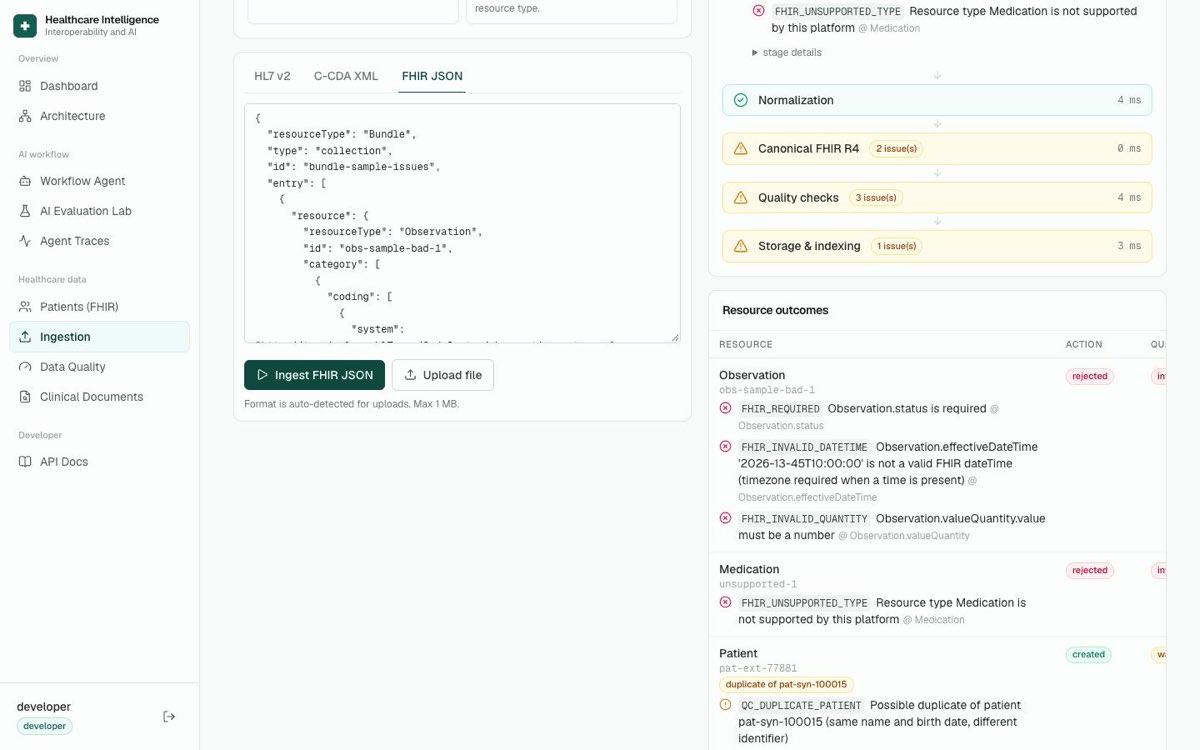
  • Each message is checked for missing, invalid, or duplicate information
  • Everything is translated into one consistent format (FHIR) and given a quality score
  • An AI agent picks the right lookups, searches notes, and gathers evidence
  • The answer is checked against the evidence before it is shown

What comes out

  • Clean, consistent patient records with a data-quality report
  • A short answer that cites the exact records and notes it relied on
  • A trace showing every step the agent took
  1. 01

    Healthcare data arrives

    Messages and documents come in from other systems — admissions, discharges, lab results, and visit summaries.

    Technical implementation: HL7 v2.5.1 (ADT^A01/A03/A04/A08, ORU^R01), C-CDA R2.1, FHIR R4 bundles via REST ingestion endpoints.

  2. 02

    Validation

    Each message is checked for problems: missing fields, invalid codes, broken references, or duplicates. Bad records are set aside instead of silently stored.

    Technical implementation: Staged pipeline: parse → syntax → schema → quality. LOINC mod-10 and SNOMED Verhoeff checks, MSH-10 duplicate detection, quarantine on error, HL7 ACK (AA/AE/AR).

  3. 03

    Normalization

    Different systems describe the same thing differently. The platform lines up codes, dates, and patient identities so everything matches.

    Technical implementation: Code-system mapping, timestamp normalization, lightweight patient matching (MPI-lite), ADT merge handling.

  4. 04

    FHIR

    Everything is stored in one modern, standard format, and each record gets a 0–100 data-quality score.

    Technical implementation: Canonical FHIR R4 resources in PostgreSQL; custom declarative validator for 10 resource types.

  5. 05

    AI Agent

    When you ask a question, the agent first screens it for safety, works out which patient and what kind of question it is, then plans which tools to use.

    Technical implementation: LangGraph graph: safety_screen → classify_intent → identify_patient → plan_tools → execute_tools → … → finalize.

  6. 06

    Tools + RAG

    The agent looks up encounters, medications, labs, and appointments, and searches clinical notes for relevant passages.

    Technical implementation: 9 typed clinical tools + hybrid retrieval (vector + keyword + section prior) over pgvector, with a relevance floor.

  7. 07

    Evidence

    Everything the agent found is collected as evidence, and the answer is checked against it. Unsupported sentences are rejected.

    Technical implementation: Grounding check: each claim must cite evidence, share ≥50% of terms, and match every number and date. LLM answers under 0.7 fall back to an extractive answer.

  8. 08

    Answer

    You get a short, plain answer with citations — and a trace you can open to see exactly how it was produced.

    Technical implementation: Server-sent events streaming, per-run traces with tool calls, latency and token usage.

Key ideas

The important parts, explained

Validation

Like a careful clerk checking a form before filing it: are required fields filled in, are the codes real, does this record point to a visit that actually exists? Problems are reported, and broken records are held back.

Technical implementation: Syntax, schema and quality stages; issues stored per record; quarantine on error.

FHIR — one common language

FHIR is the modern standard way to describe health records. Converting everything into it means a lab result looks the same no matter which system sent it.

Technical implementation: Canonical FHIR R4 resources; HL7 v2 segments (PID, PV1, DG1, AL1, OBR, OBX, NTE) mapped to FHIR.

The AI agent

Rather than one big guess, the agent follows a fixed sequence of steps: check the question is safe, figure out the patient, choose the lookups, run them, then write the answer.

Technical implementation: LangGraph state machine with conditional edges; rules or LLM planner.

Grounded answers

Every sentence in the answer has to be backed by a record or note the agent actually found. Sentences that can't be backed up are removed.

Technical implementation: Claim-level grounding verifier with citation, term-overlap and number/date matching.

What do these words mean?A short glossary of the terms used on this page.
HL7
The classic message format hospital systems send each other.
C-CDA
A standard format for clinical documents like visit summaries.
FHIR
The modern standard for storing and sharing health records.
Validation
Checking data for missing or invalid information.
RAG
The AI searches documents first, then answers using what it found.
LangGraph
Runs the AI agent as a clear, step-by-step workflow.
AI Agent
An AI that decides which tools to use to answer a question.
MCP
A standard way for other AI tools to use the platform's functions.
Evaluation
A test set that scores the agent's answers.

Screenshots

Inside the application

Captured from the demo environment — synthetic data only.

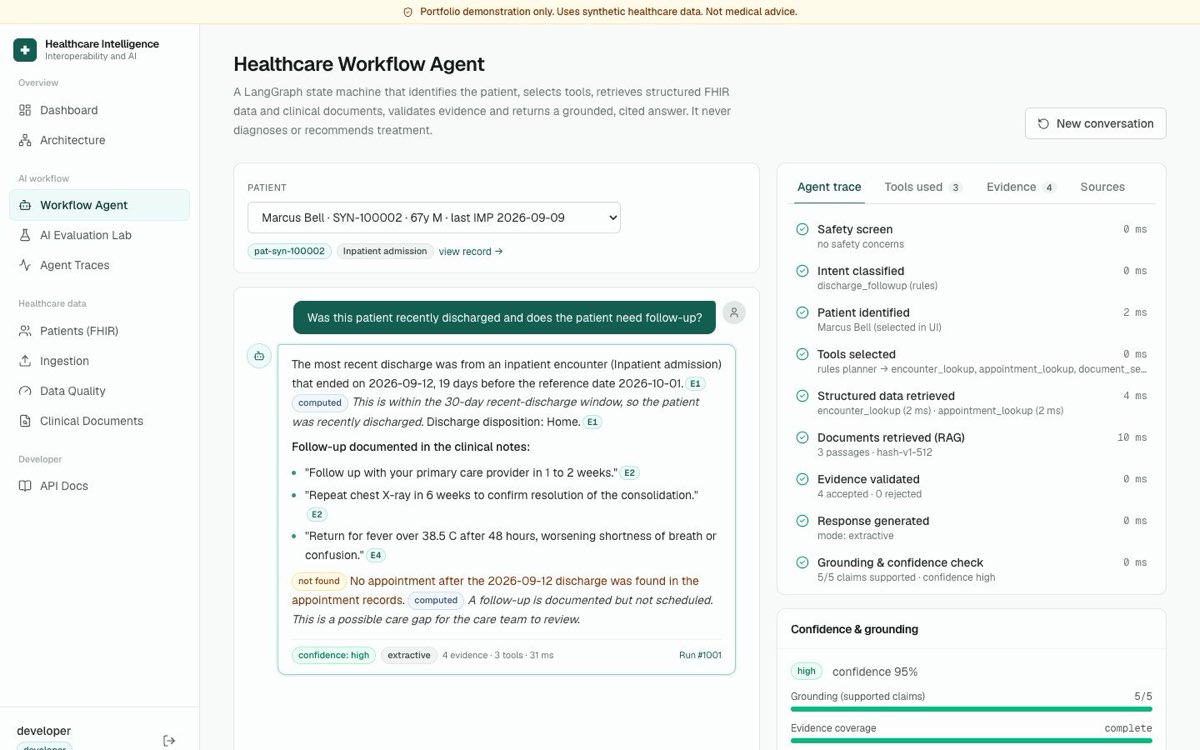
Healthcare Workflow Agent answering a discharge follow-up question with citations and a step-by-step trace
The agent answers a follow-up question, cites evidence (E1, E2…), and shows each step it took.
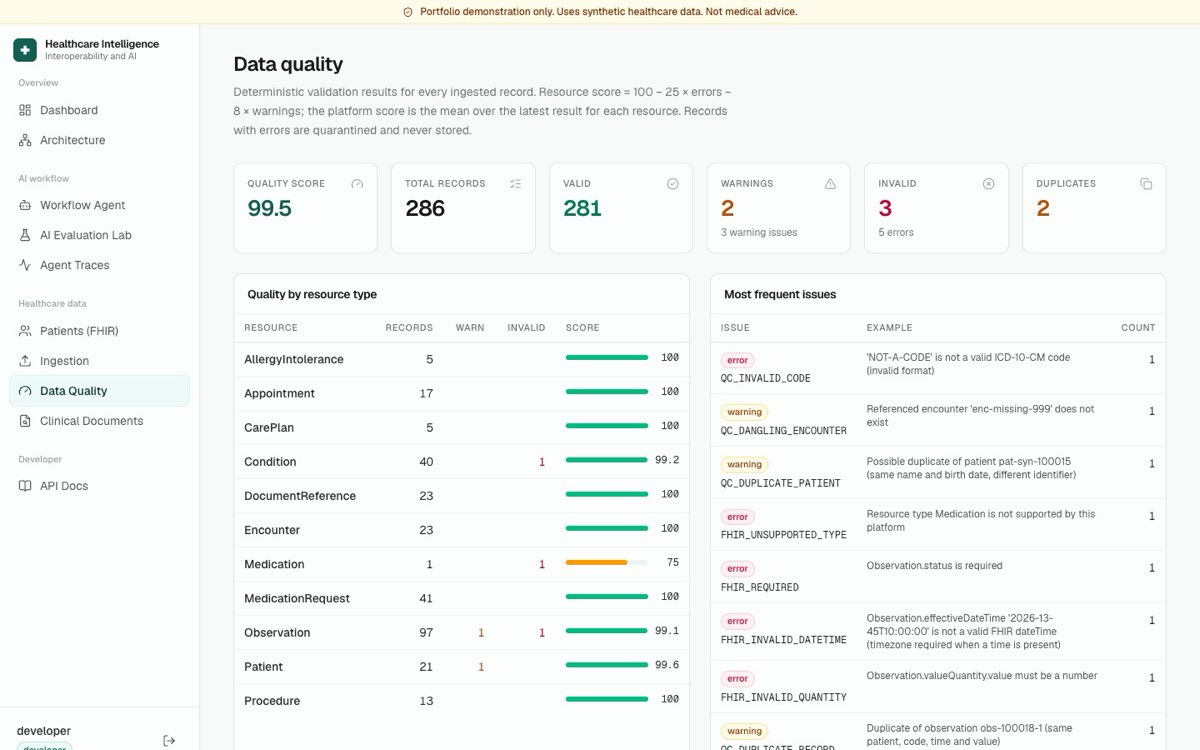
Data quality dashboard showing a quality score, invalid records and most frequent issues
Data quality: scores per resource type and the most common validation issues.
Ingestion page showing a healthcare message moving through validation stages
Ingestion: each message moves through parse, validate, normalize and store.
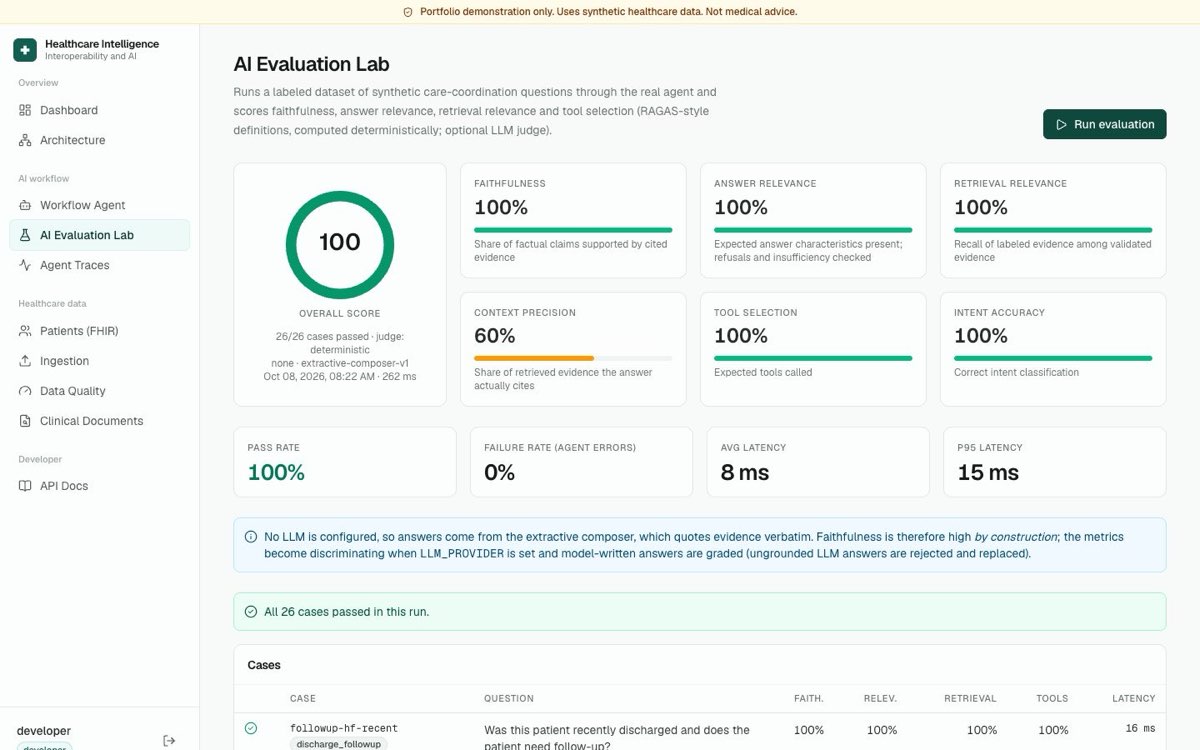
AI evaluation lab showing scores for faithfulness, relevance and tool selection
Evaluation lab: labelled questions scored for faithfulness, relevance and tool choice.

Architecture

Under the hood

The short version is the flow above. Open the panel below for the engineering detail.

  1. Data
  2. Validation
  3. FHIR
  4. AI Agent
  5. Tools + RAG
  6. Evidence
  7. Answer
Technical architectureComponents, data layer, agent graph, tools, and security.
Ingestion pipeline
Parse → syntax → schema → normalize → canonical FHIR → quality → store. Every stage is recorded as an ingestion event so problems can be traced.backend/app/ingestion/pipeline.pyingestion/hl7/*ingestion/ccda/parser.pyingestion/fhir/validator.py
Data layer
PostgreSQL 16 stores canonical FHIR R4 resources. Clinical note chunks live in pgvector with an HNSW index. SQLite is supported for local development and tests.
Agent (LangGraph)
Ten nodes: safety screen, intent classification, patient identification, tool planning, tool execution, document retrieval, evidence validation, response generation, grounding check, finalize. Conversation memory via a checkpointer.backend/app/agents/graph.pyagents/nodes.pyagents/grounding.py
Tools
patient_lookup, encounter_lookup, medication_lookup, condition_lookup, observation_lookup, document_search, appointment_lookup, clinical_summary, healthcare_data_quality.
LLM providers (optional)
None (extractive, default), Anthropic, OpenAI, or Claude via AWS Bedrock — selected by configuration.
MCP server
A thin stdio adapter over the REST API exposing 9 tools, so MCP-compatible assistants can query the platform.
Security
JWT auth with viewer / developer / admin roles, PBKDF2 password hashing, rate limiting, secure headers, audit log. The public demo login never grants admin.
Frontend & deployment
React + TypeScript (Vite) UI with dashboards for ingestion, quality, agent, evaluation and traces. Dockerised backend and frontend.
Technology

Built with

Backend

  • Python 3.12
  • FastAPI
  • Pydantic v2
  • SQLAlchemy 2
  • Alembic

Data

  • PostgreSQL 16
  • pgvector
  • FHIR R4

AI

  • LangGraph
  • Hybrid RAG
  • MCP
  • Anthropic / OpenAI / Bedrock (optional)

Healthcare

  • HL7 v2
  • C-CDA R2.1
  • FHIR R4
  • LOINC
  • SNOMED CT
  • RxNorm
  • ICD-10-CM

Frontend

  • React 19
  • TypeScript
  • Vite
  • Tailwind CSS

Delivery

  • Docker
  • Docker Compose

Safety

Safety & synthetic data

  • Synthetic data only. Every patient, record and note in the demo was generated for this portfolio — no real patient information is used.
  • Synthetic markers are built in: MRNs use a SYN- prefix and phone numbers use the reserved 555-01xx range.
  • This is a portfolio demonstration, not a medical device, and it does not give medical advice. The agent states documented facts and never recommends diagnoses or treatment.
  • The agent refuses prompt-injection attempts and redirects emergencies.
  • The public demo login is limited (viewer/developer roles) and can never grant admin access.